 CarFlow AI
Blur license plates on video
Drop a car video — AI detects and blurs every plate, frame by frame. We delete your videos within 6 hours.
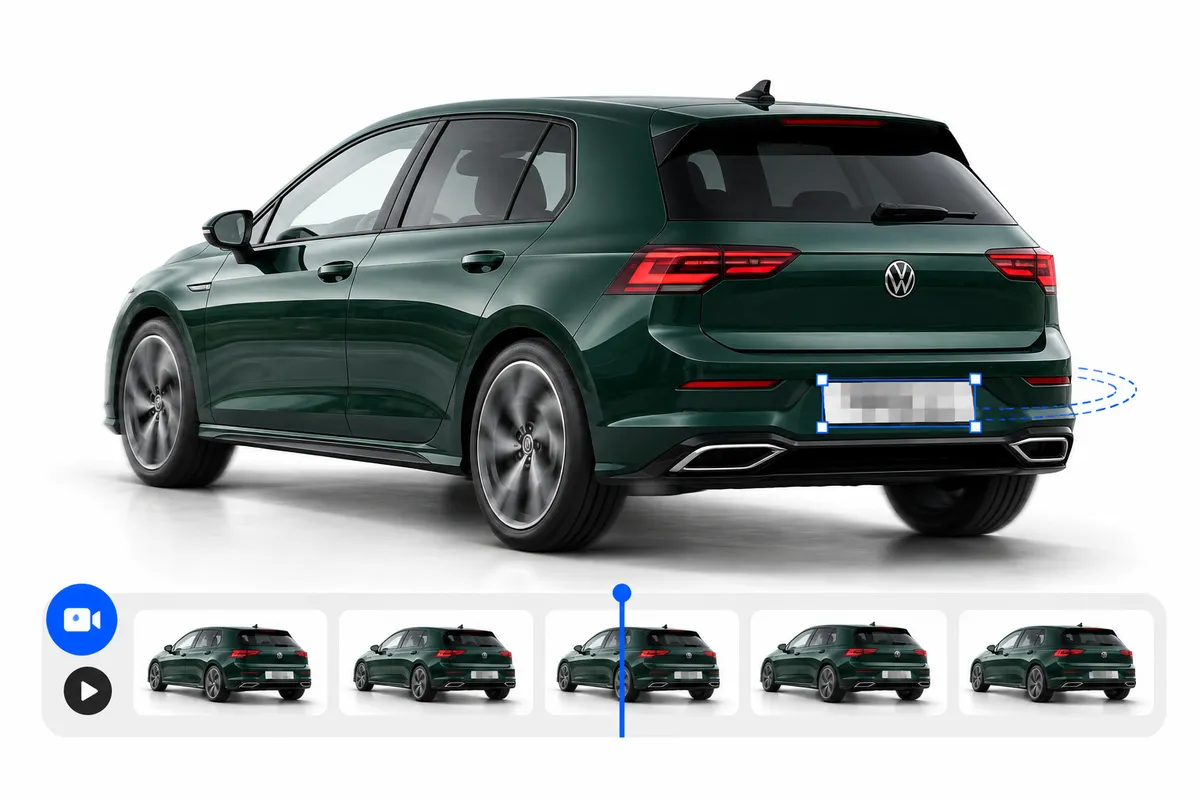
A dealership-style walkaround processed by the free tool. The front and rear plates are covered automatically; nothing else in the frame is touched.
Drop your video here
MP4, MOV or WebM
Up to 5 seconds — longer clips are trimmed
Free limit: 1 video per hour
Resolution above 1080p is downscaled to Full HD
By uploading, you agree to our Terms and Privacy Policy. Videos are processed by AI to blur license plates and deleted within 6 hours.
- No hourly limit
- Videos never deleted
- Close the tab — processing keeps going
- Videos up to 3 minutes
How it works
Upload your video
Drop a car video from your phone or camera - a walkaround, a test drive, a delivery clip. No signup needed.
AI tracks every plate
Computer vision follows each license plate across frames - even when it's small, at an angle, or briefly hidden - so the blur never flickers or slips.
Download the blurred video
Get the processed clip back in the same resolution, ready to post. Originals are deleted from our servers.
Why blur license plates in car videos
A video exposes a number plate far longer than a photo does. A walkaround holds it in frame for seconds, a dashcam clip records every car that passes, and anyone can pause on a single frame and read it. Blurring runs once, before the clip goes out.
One frame is enough to expose it
Viewers can pause, screenshot and zoom. A plate that is readable in any single frame of the clip is readable, full stop — which is why the cover has to hold across the whole video.
Your footage catches other people's cars
Road clips, forecourt shots and parking manoeuvres pick up vehicles that never agreed to appear. Their plates are not yours to publish.
Keeps you on the safe side of GDPR
Dealers, rental fleets and channels publishing car videos at scale are generally expected to handle a readable number plate as personal data — anonymize it and the question does not come up.
Matches platform and marketplace rules
Many classifieds sites and video platforms ask for plates and faces to be masked before a listing or clip goes public.
Where video plate blur is used
Dashcam and road footage
Near-misses, traffic clips and journey recordings full of other people's cars — every plate that drives through the frame gets covered.
Dealership walkarounds
Stock videos and forecourt tours where the same plate stays in shot for the whole clip, across a full inventory.
Reviews and test drives
Presenter footage, rolling shots and interior clips for YouTube, Reels and TikTok, published without exposing the car's identity.
Rental and carsharing handovers
Condition videos recorded at pickup and return, kept as evidence and shared with customers or insurers.
Blur plates in video without manual masking
In an editor you draw a mask over the plate and then keyframe it as the car moves — every clip, every plate, every cut. Here the detector finds each plate in every frame and the tracker keeps the cover locked to it, so a clip takes one upload instead of an evening.
| What matters | Premiere / After Effects | Phone editing app | CarFlow AI |
|---|---|---|---|
| Finds the plates for you | No — mask each one by hand | No — draw over it by hand | Yes, automatically |
| Follows a moving car | Manual tracking and keyframes | Drifts off, needs fixing | Tracked frame by frame |
| Several plates in one shot | One mask per plate | Barely workable | All plates in one pass |
| Skills required | Editing experience | Basic, but slow | None |
| Price | Paid subscription | Free or paid | Free, no signup |
| Your time per clip | An evening of keyframing | Scrubbing frame by frame | One upload, then nothing |
What the video tool handles
The detector runs on real footage rather than clean plate scans, and the cover follows the shape of each plate instead of sitting in a box around it.
MP4, MOV and WebM
The formats phones, cameras and dashcams record in. Vertical, horizontal and square clips all work — the output keeps the aspect ratio you uploaded.
Tracked through the whole clip
Each plate is followed between frames and the gaps are filled in, so the cover does not flicker when a plate is briefly hidden by a pillar, a wiper or another car. Scene cuts start fresh tracks instead of dragging a blur across the edit.
Fits the plate, not a rectangle
The model returns the outline of each plate and the cover is applied through that shape with a soft edge, so an angled plate gets an angled cover and the bumper around it stays untouched.
Every car in the frame
Traffic, showroom rows and car parks are handled plate by plate — each plate found in a frame gets its own cover, however many are on screen.
Blur, pixels or a solid box
Pick a soft blur, pixelation, or a solid white or black box before you start. The same style is applied to every plate in the clip.
Sound and quality kept
The audio track is carried over untouched and the clip comes back at its original frame rate. Up to 5 seconds; anything above Full HD is delivered at 1080p.
Frequently asked questions
Drop your car video above — the AI detects every license plate and blurs it frame by frame, tracking each plate through the whole clip. No manual masking, no signup.
Yes — 1 video per hour, up to 5 seconds, free and without an account. Longer videos are trimmed to the first 5 seconds; for full-length clips use the account tool.
MP4, MOV and WebM — the formats phones and cameras record in. Vertical, horizontal, and square videos all work; clips over 1080p are delivered in Full HD.
Yes. Videos are processed only to blur plates and deleted from our servers within 6 hours, same as our photo tool. Nothing is shared, and nothing is used to train models.
Yes - our free photo tool is also live. Upload up to 5 car photos and the AI blurs every plate in seconds, no signup needed.
Yes. Only the picture is touched — the original audio track is carried straight over to the exported clip, so commentary and engine sound come back unchanged.
Each plate is detected and tracked separately, so two cars side by side get two covers rather than one block spanning both. That holds in traffic and in showroom rows as well — every plate visible in a frame is handled on its own.
Yes. Choose blur, pixelation, a solid white box or a solid black box before you start, and that style is applied to every plate in the clip. Solid boxes are the safest choice when the footage will be re-encoded or compressed afterwards.
Yes, that is one of the common uses. Plates in dashcam clips are usually small, moving fast and often at an angle, which is exactly what the tracker is for — it follows each plate between frames and fills the gaps when one is briefly hidden.
A short clip is usually done in a couple of minutes. The video is analysed frame by frame on a GPU, so it takes longer than the photo tool — you can leave the tab open and the result appears when it is ready.
Not yet — this tool covers license plates only. Face blurring is not part of this tool, so if your clip shows people you will need to handle that separately for now.
Exactly the plate. The model returns the outline of each plate in every frame and the cover is applied through that shape with a softened edge, so an angled plate gets the same slanted shape rather than an upright rectangle that also swallows the bumper. The same applies to pixelation and the solid boxes.